Recently the Azure Security Center (ASC) team have released a preview of a new PowerShell module they have been working on, AzureRM.Security. This module is designed to allow you to manage the ASC automatically. You can view the module on the PowerShell gallery here. Below I will show you how to install the module and run a few commands to show you want it does.
First
look
Requirements
To be able to use
this module you will need to make sure you meet the following requirements:
PowerShellGet version
1.6.7 or later
AzureRM.Profile version
5.5.0 or later.
The
Installation
Open PowerShell
in admin mode and type the following to Update
PowerShellGet
This file contains hidden or bidirectional Unicode text that may be interpreted or compiled differently than what appears below. To review, open the file in an editor that reveals hidden Unicode characters.
Learn more about bidirectional Unicode characters
Now enter this
command to install the correct version of AzureRM.Profile.
This file contains hidden or bidirectional Unicode text that may be interpreted or compiled differently than what appears below. To review, open the file in an editor that reveals hidden Unicode characters.
Learn more about bidirectional Unicode characters
Now you can
actually install the new module by using:
This file contains hidden or bidirectional Unicode text that may be interpreted or compiled differently than what appears below. To review, open the file in an editor that reveals hidden Unicode characters.
Learn more about bidirectional Unicode characters
Open a normal
PowerShell window and type the following to load the correct version of AzureRM.Profile.
(The newest one is not currently supported.)
This file contains hidden or bidirectional Unicode text that may be interpreted or compiled differently than what appears below. To review, open the file in an editor that reveals hidden Unicode characters.
Learn more about bidirectional Unicode characters
This file contains hidden or bidirectional Unicode text that may be interpreted or compiled differently than what appears below. To review, open the file in an editor that reveals hidden Unicode characters.
Learn more about bidirectional Unicode characters
Now we can actually use the module. First, you will need to login to your Azure account. You will need to use a user that has access to the ASC.
In the PowerShell
window type the following to connect to Azure.
This file contains hidden or bidirectional Unicode text that may be interpreted or compiled differently than what appears below. To review, open the file in an editor that reveals hidden Unicode characters.
Learn more about bidirectional Unicode characters
This file contains hidden or bidirectional Unicode text that may be interpreted or compiled differently than what appears below. To review, open the file in an editor that reveals hidden Unicode characters.
Learn more about bidirectional Unicode characters
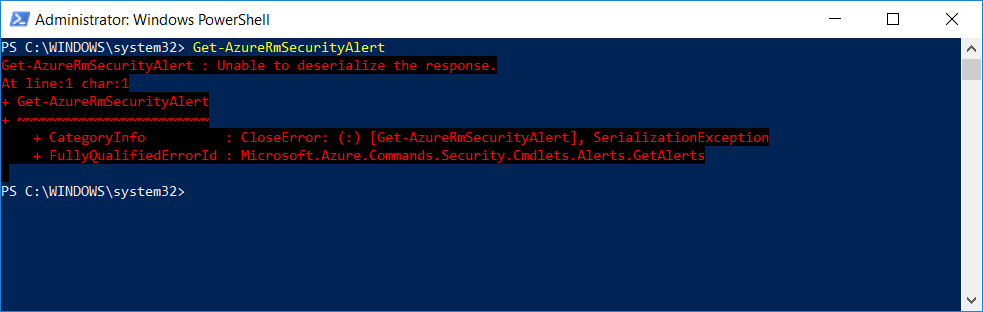
Hmm, this one seems broken. Well it is in preview still. Lets try another.
This file contains hidden or bidirectional Unicode text that may be interpreted or compiled differently than what appears below. To review, open the file in an editor that reveals hidden Unicode characters.
Learn more about bidirectional Unicode characters
To get a list of the cmdlets use the following command.
This file contains hidden or bidirectional Unicode text that may be interpreted or compiled differently than what appears below. To review, open the file in an editor that reveals hidden Unicode characters.
Learn more about bidirectional Unicode characters
I’m Richard Hooper aka Pixel Robots. I started this blog in 2016 for a couple reasons. The first reason was basically just a place for me to store my step by step guides, troubleshooting guides and just plain ideas about being a sysadmin. The second reason was to share what I have learned and found out with other people like me. Hopefully, you can find something useful on the site.
Reading Time: 5minutesShare:Recently while browsing through the Azure CLI extensions repo (yes, that’s how I spend my evenings), I stumbled across a pair of pull requests that made me sit up and pay attention. Azure is adding --enable-hosted-system to Read more
Reading Time: 6minutesShare:Recently I spotted something new in the AKS CLI preview. Flatcar showed up as a valid OS SKU for Linux node pools. As someone who’s been running AKS clusters for years, I was curious to Read more
Reading Time: 2minutesShare:Intro I recently ran into capacity issues in Azure and saw firsthand how AKS VMSS node pools behave when you use deallocated nodes to speed up start-times. I’ll walk through the three node-pool zone models Read more











0 Comments